
TrueInsight
Siemens/Altair Channel Partner
Menu

What Is Siemens Designcenter and How it Affects Existing NX and Solid Edge Users
Learn about the evolution in Siemens CAD and Design offering, specifically Designcenter and how it affects existing users.
If you've opened a recent Siemens release note and wondered where NX went, you're not alone. Over the past two years, Siemens has rolled its mechanical design software into a single brand called Designcenter, and the names on your license file, installer and invoices might look a little different.
The short version: your software didn't go anywhere. NX and Solid Edge are still the same products, built on the same technology, supported the same way. What changed is how Siemens packages and names them. This post walks through what Designcenter is, exactly which names changed, what stayed the same, and what (if anything) you need to do about it.
What Designcenter is
Designcenter is Siemens' umbrella brand for its mechanical design software. It was first announced at CES in January 2025 and reintroduced at Siemens' Realize LIVE user conference that June. It covers NX, Solid Edge, their cloud ("X") versions, and the browser-based tools that sit alongside them.
The idea is portfolio consistency. Siemens already sells Teamcenter for PLM, Simcenter for simulation and Opcenter for manufacturing operations. Designcenter gives design its own "-center" name in the Siemens Xcelerator lineup, so the portfolio reads as one connected system instead of a collection of acquired brands.
There's a technical story behind it too. NX and Solid Edge both run on the Parasolid modeling kernel. Siemens is using the shared brand to signal that teams can mix the two products and move between them without the translation headaches you get when CAD tools are built on different kernels.
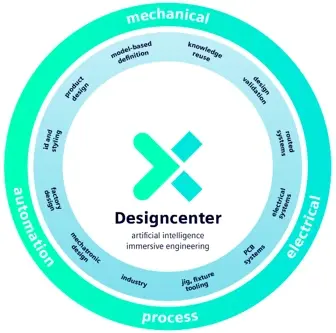
Fig1 : Capabilities under the Designcenter umbrella
What changed: The Names
One practical takeaway: when Siemens or a partner says "Designcenter" on its own today, they usually mean the product formerly called NX. When they mean Solid Edge, the name still says Solid Edge.
The cloud side also got more consistent. Designcenter X comes in four tiers (Essentials, Standard, Advanced and Premium), and they all work on the same architecture and part files. That means you can move a user up a tier without converting any data. The browser-based Essentials tier, which offers lightweight CAD, CAM and CAE from any device, is now bundled with Designcenter X Solid Edge subscriptions, so many Solid Edge cloud users already have it.
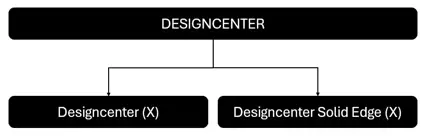
Fig 2: Designcenter product name hierarchy
What stayed the same
For day-to-day engineering work, almost nothing changed.
- The software itself. Designcenter is the same NX codebase on the same continuous release cadence. Designcenter Solid Edge still ships its annual release. The rename didn't remove any commands, modules or workflows.
- The kernel and your data. Both products still run on Parasolid. The rename is a branding change, and Siemens hasn't announced any change to file formats because of it.
- The way the products fit together. NX-class tools still serve complex, enterprise-scale product development with integrated CAM and CAE. Solid Edge still serves mainstream mechanical design, sheet metal and small-to-midsize teams.
- Your connections to the rest of Xcelerator. Teamcenter data management, Simcenter simulation and CAM workflows still connect the same way they did before.
In other words, the engineer at the workstation shouldn't notice a difference beyond a new splash screen and a new name in the title bar.
What about CAM and manufacturing?
Siemens' manufacturing tools have kept their own names for now. The June 2026 rename removed "NX" from the design product, but the CAM side still ships as NX CAM: the June 2026 release is branded NX for Manufacturing 2606, and the cloud version is still called NX X Manufacturing. Siemens also added CAM-only NX X Manufacturing packages in Standard, Advanced and Premium tiers for shops that design in another CAD system or receive models from customers.
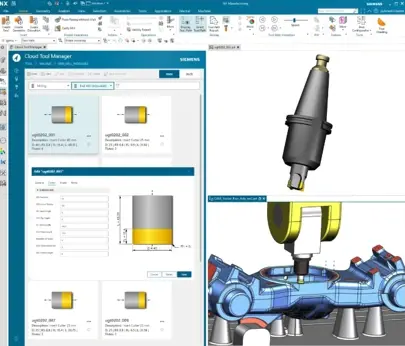
Fig 3: NX Manufacturing Interface
On the Solid Edge side, Solid Edge CAM Pro, which is built on NX CAM technology, hasn't been part of any announced rename. Your toolpaths, post-processors, tool libraries and machine setups aren't affected. CAM still works on the same Parasolid geometry, so a model built in Designcenter or Designcenter Solid Edge goes into CAM the same way it did before. The one thing to watch for is paperwork: your design seat may now say "Designcenter" while your CAM seat still says "NX," so expect mixed names on quotes and license files until Siemens settles its manufacturing branding.
What it means for you
Most existing customers don't need to do anything, but a few housekeeping items are worth doing so the new names don't cause confusion.
- Search smarter. Siemens documentation, release notes and community posts now use "Designcenter." If a search for NX help comes up thin, try the new name. Older content will still say NX.
- Look at what's now included. The Designcenter X tiers and the bundled Essentials browser app may give some of your users capabilities they didn't have before, such as viewing, markup and lightweight CAM or simulation from a browser. This is especially useful for non-CAD stakeholders like manufacturing, quality and purchasing.
- Revisit the NX vs. Solid Edge question. Because both products share Parasolid and sit under one brand, mixed teams are easier to run than before. If part of your team has outgrown Solid Edge, now is a good time to re-evaluate your license mix.
Designcenter is a new name, not a new product. NX is now Designcenter, Solid Edge is Designcenter Solid Edge, and both still run on the same Parasolid foundation you've been building on for years. The real opportunity in the rebrand is the cloud tiers and bundled browser tools, which may give your team more capability than you're currently using.
Not sure how the new names map to your current licenses, or whether your mix of NX and Solid Edge seats still fits how your team works? The TrueInsight team can walk you through it. Contact us for a quick license review.