
TrueInsight
Siemens/Altair Channel Partner
Menu



Managing Large CAD Assemblies Efficiently with Siemens Teamcenter
See how Siemens Teamcenter can help users tackle the challenges with large CAD Assemblies.
If you’ve ever tried to work with a large CAD assembly without some type of data management program, you probably know the struggle: Files can take forever to open, someone overwrites something they shouldn’t have, assemblies break because references get lost or nobody is completely sure if they’re working on the latest version.
Siemens Teamcenter isn’t a CAD system, it manages everything around your CAD data. When implemented correctly, it completely changes how teams work with large assemblies, making them faster, more reliable, and far easier to manage. Let’s walk through the challenges of managing large assemblies and how Teamcenter solves them.
The Real Problem with Large CAD Assemblies Isn’t Size, It’s Complexity
A large assembly might contain hundreds, thousands, or even tens of thousands of components. But the real issue isn’t just the number of parts, it’s the relationships between them. With regards to those relationships, assemblies can include:
- Parts referencing other parts
- Subassemblies nested multiple levels deep
- Drawings tied to specific revisions
- Simulation models based on specific configurations
- Multiple engineers working on different sections of a design
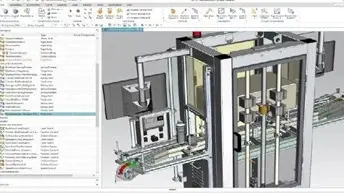
Fig 1: Large assembly example in Siemens Designcenter NX
Then on top of those complexities, add real-world workflows that can also impact data integrity:
- Engineers making changes simultaneously
- Design revisions happening daily
- Parts being reused across multiple assemblies
- Suppliers accessing certain data but not everything
- Manufacturing relying on released versions
Without a proper management system, this can quickly turn into chaos. Shared drives, local folders, and even basic PDM systems struggle to handle this level of complexity reliably.
Why Traditional File Management Breaks Down
Many companies start with shared network drives or basic folder structures. This works fine early on, but it doesn’t scale. As companies add additional users, projects and files, it creates challenges that typically aren’t as visible in the early stages. Here’s are some of the typical challenges:
Lost or Broken references
With file folder systems or shared folders, assemblies rely on exact file paths. Something like C:Users/User Name/Project Name… If someone moves a file, renames it, or copies it incorrectly, those assembly references break. Suddenly engineers see missing components or outdated geometry.
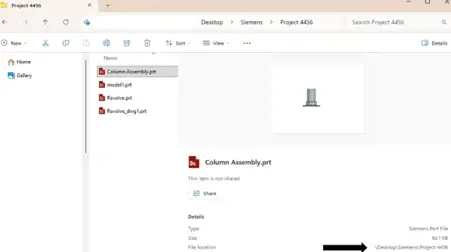
Fig 2: File Path example in file folder system
Version confusion
Because engineers are worried about overwriting correct file versions, you will see them start to create their own naming structures within the folder. This adds a lot of confusion on which file is the actual correct version. You’ll see files like:
- Final.prt
- Final_v2.prt
- Final_v3_REAL.prt
- Final_v3_REAL_USE_THIS_ONE.prt
This also means that if the original file is being used in an assembly, then the updated file is not being referenced, therefore the assembly is using outdated files.
Slow performance
The root cause comes down to how traditional file systems handle assemblies. When you open a large assembly using unmanaged folders or shared drives, your CAD system has to locate and load every referenced component individually. This means the system must:
- Search for each file across network folders
- Verify references and relationships
- Load full-resolution geometry for every component
- Resolve assembly hierarchy manually
- Pull data across the network, often from slow or busy servers
Because of performance issues, it’s common to see engineers start using their own workarounds like creating local copies of assemblies, suppressing components unnecessarily or avoiding opening full assemblies all together.
Lack of traceability
Traceability is one of the most critical aspects of engineering data management, especially as products become more complex.
Without proper traceability, teams lose visibility into the history of their designs. This creates uncertainty and risk throughout the product development process. In unmanaged environments, common questions become surprisingly difficult to answer: Who modified this part? When was it changed? What exactly was changed? Which version was released to manufacturing?
All the guesswork that comes from not being able to readily answer these questions quickly can lead to manufacturing errors and overall confusion from the engineers.
How Siemens Teamcenter Addresses These Challenges
There are plenty of PDM solutions that can address the basic challenges of managing large CAD assemblies, things like: Version control, file locking, and preventing broken references. Teamcenter includes tools that go beyond basic file management. Instead of just organizing CAD files, Teamcenter manages the entire product definition, including assemblies, revisions, configurations, simulation data, and release processes, all within a structured and scalable system.
It connects design, simulation, and manufacturing into a single environment, making it easier to manage changes, maintain traceability, and coordinate across teams. Teamcenter doesn’t just help engineers manage files, it helps companies manage their entire product lifecycle.
Efficient Assembly Loading with Structure-Based Management
One of Teamcenter’s biggest strengths is how it manages assembly structure. Instead of blindly loading every component from disk, Teamcenter understands assembly hierarchy, component relationships, revision status and configuration rules.
Engineers have more control over how they load these files:
- Load only necessary components
- Work with lightweight representations
- Expand assemblies selectively
- Navigate large assemblies instantly
This dramatically improves performance, especially for assemblies with thousands of parts. Instead of waiting minutes, assemblies open in seconds.
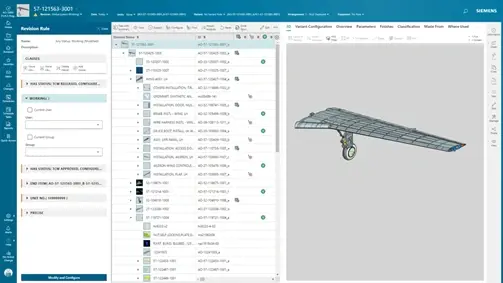
Fig 3: View of associated assembly data
Built-In Revision/Version Control
Teamcenter automatically manages revisions and versions based on your company’s definition. Engineers don’t have to manually create duplicate files or worry about naming conventions.
Each part has:
- Revision history
- Change tracking
- Release status
- Ownership and permissions
When an engineer modifies a part, Teamcenter creates a new revision while preserving previous versions. This ensures nothing gets overwritten accidentally, previous versions are always accessible, and manufacturing always uses released versions.
Preventing Engineers from Overwriting Each Other’s Work
This is one of the most immediate benefits teams notice. Like most PDM systems, Teamcenter uses a check-in / check-out system. When an engineer checks out a part or assembly:
- It’s locked for editing
- Others can still view it
- But they cannot overwrite it
This prevents conflicts entirely. Multiple engineers can safely work on different parts of the same assembly without interfering with each other. This is essential for large teams working on complex products.
Maintain Assembly Integrity Automatically
Teamcenter manages references automatically. This means:
- Assemblies never lose track of components
- Renaming files doesn’t break references
- Moving data doesn’t break assemblies
- Relationships remain intact
Engineers don’t have to worry about file paths or folder structure. They just work with the assembly. This alone eliminates one of the most frustrating issues engineers deal with.
Work with Large Assemblies Using Lightweight Representations
Teamcenter’s lifecycle visualization allows engineers to work with lightweight JT (Juniper Tessellation) versions of assemblies instead of loading full detailed models every time. This provides major performance improvements. This makes working with large assemblies much more manageable.
Engineers can:
- View assemblies without loading full CAD geometry
- Open and navigate assemblies with tens of thousands of parts instantly
- Fully Load detailed components only when needed
- View files from multi-CAD environments
- Enable non-CAD users to access assemblies without NX installed
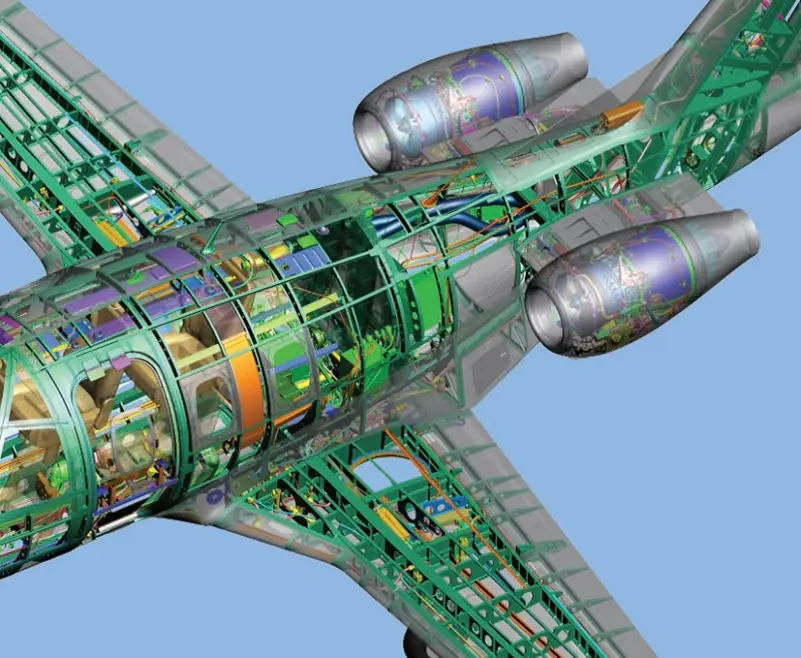
Fig 4: Teamcenter Lifecycle visualization mockup
Engineering Change Management
Engineering changes are inevitable. Teamcenter provides structured change management workflows that are designed to go above what a typical PDM (Product Data Management) system could do. Outside of the standard change requests, approvals and revision tracking, Teamcenter also includes:
- Exact assembly states at release points, rather than just revisions.
- Variant configurations
- Option-dependent assemblies
- Historical product definitions
Engineers can safely make changes while maintaining stability, manufacturing always sees the correct released versions and designers can continue improving designs without disrupting production.
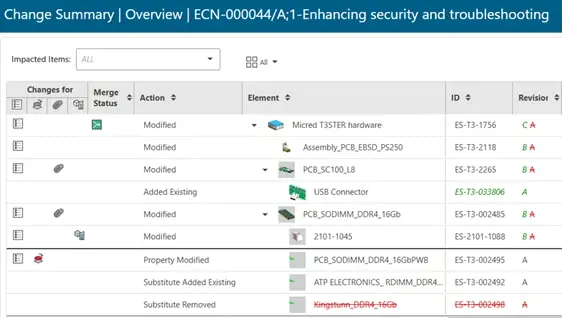
Fig 5: Engineering change example in Siemens Teamcenter
Work Seamlessly with Siemens NX and Solid Edge
Teamcenter is tightly integrated with the Siemens digital thread platform, and specifically the design tools, Siemens NX and Solid Edge. The goal is to reduce the amount of friction in an engineer’s workflow.
Engineers can:
- Open assemblies directly from Teamcenter inside NX, Solid Edge and most popular CAD packages in the market like SolidWorks, CATIA and Creo.
- Save revisions automatically based on company definition
- Track changes without leaving CAD tool
This removes friction from the workflow, because engineers don’t need to manually manage files, Teamcenter handles it in the background. That way engineers can spend more time on what matters to them, their design.
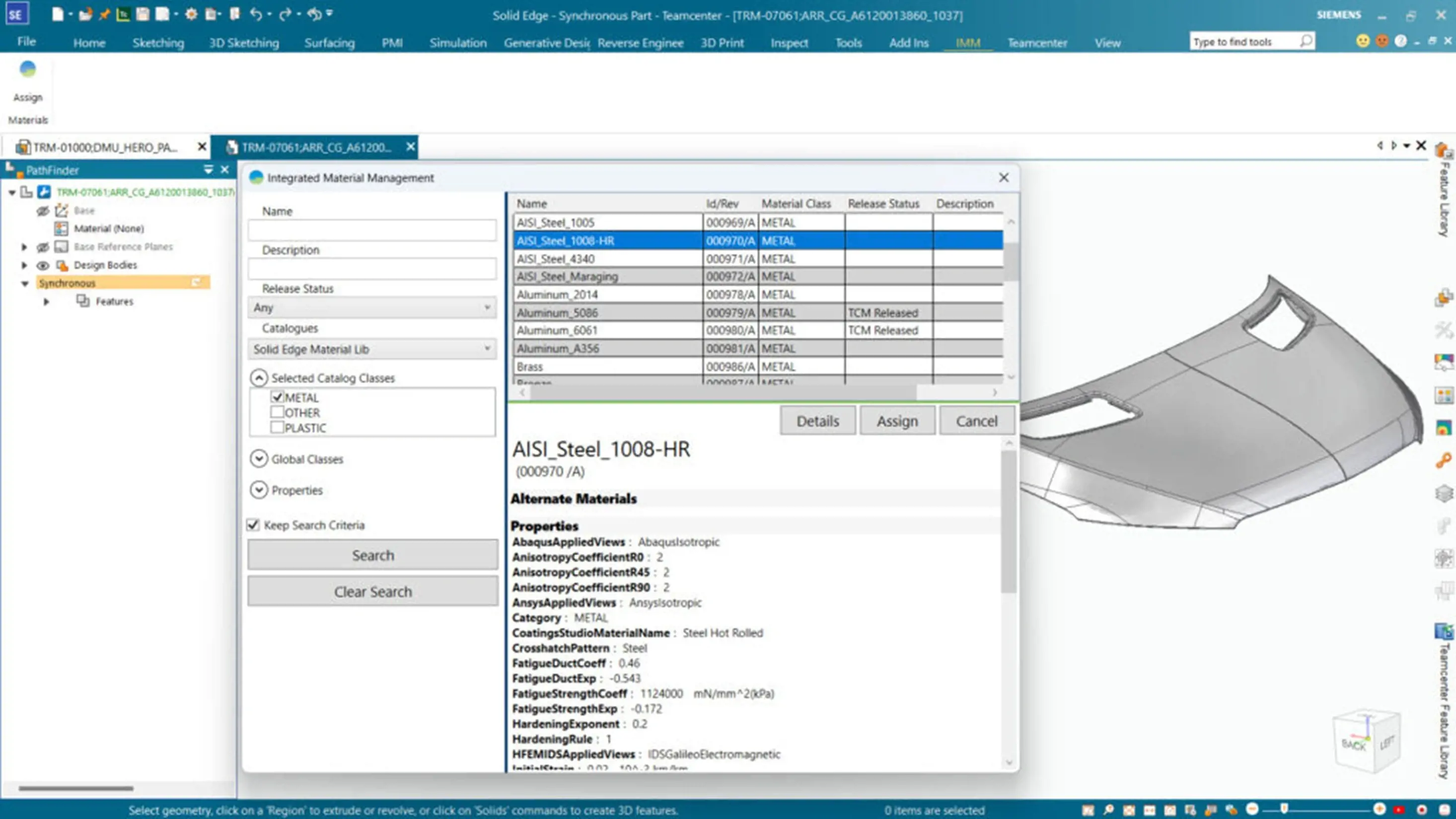
Fig 6: Teamcenter working within Siemens Solid Edge
Improve Collaboration Across Teams
When we start looking at the bigger picture (Full Lifecycle) of a design, that typically involves more teams than just Mechanical Engineers, this is where Teamcenter thrives. Large assemblies often involve multiple teams like Mechanical Engineers, Simulation Engineers, Manufacturing Engineers, Suppliers and Project Managers.
Teamcenter manages more than CAD files. It manages the full digital definition: CAD assemblies, simulation models, manufacturing data, BOM structures (Both Engineering, Service and Manufacturing BOMs) and product documentation. These are all connected to one design but would typically be needed by different users. Teamcenter provides a central platform where everyone accesses the same data.
Large CAD assemblies are inherently complex. Trying to manage them with folders and shared drives eventually becomes inefficient and risky. Siemens Teamcenter transforms assembly management by providing structure, version control, and reliable data organization.
For companies working with large assemblies Teamcenter is more than just helpful, it becomes a critical part of maintaining efficiency as products and teams grow. If you have any questions or want to discuss this further, please reach out.