
TrueInsight
Siemens/Altair Channel Partner
Menu



What's New in Designcenter Solid Edge 2027
Check out the newest enhancements in Designcenter Solid Edge 2027
Designcenter Solid Edge 2027 is available November 18th, 2026! In this post, we’ll walk through some of the enhancements users will get access to. This release is less about one headline feature and more about removing friction across the whole workday.
- Smarter Assistance: AI Design Copilot gets agentic, and cloning and placement get automated.
- Faster Workflows: Holes, patterns, edits, and section views take fewer steps.
- Better User Experience: Assembly interaction, annotation, and sheet metal refinements.
- Simcenter Simsolid integration: Simulation-driven design without meshing or file export.
Smarter Assistance
Automatic cloning and Magnetic Snap for similar components
AI-powered cloning duplicates components across large assemblies. Quickly identify and duplicate geometry using magnetic snap features, so users no longer select each face and target by hand. Fasteners can now be cloned during the initial placement step. Solid Edge uses hole depth and optimized orientation to position each one correctly, then applies constraints and duplicates the parts across the model automatically.
Users can now also use the new “Mouse-Up Mode” with magnetic snaps that let users drag and place components without needing to hold the mouse button down for the entire operation. Placement becomes a simple two-click workflow, which improves control and reduces physical strain. Users can still adjust views and reposition the assembly freely mid-placement.
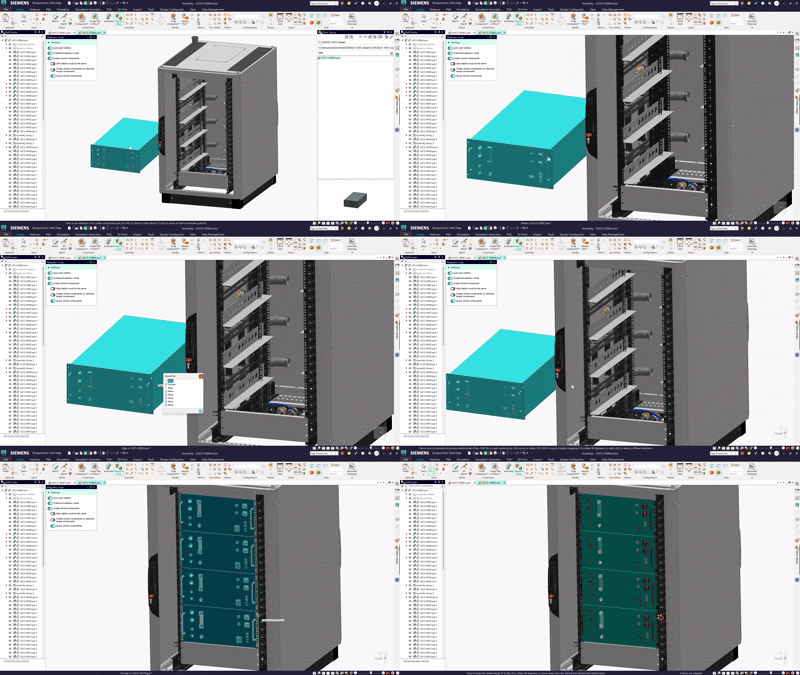
Fig 1: Magnetic snap options menu
Design Copilot Agentic Mode
Agentic Mode in the Designcenter X version allows the built-in AI Assistant, Copilot, execute multi-step workflows straight from the chat. Ask it to create an automatic drawing for the active part, and it runs the steps and shows an Auto Drawing Preview with the template, sheet size, and views it will use. You can also:
- Automate tasks like file exports and drawing creation in plain language.
- Retrieve physical design properties without digging through menus.
- Launch commands without manual UI navigation.
Automated Drawings
In the previous version of Solid Edge users could automate end-to-end drawing creation using Automatic Drawings. Users could use your existing drawing templates and optionally select sheet size and base view to generate your drawing from. With Designcenter Solid Edge 2027, users can now generate drawings for Sheet Metal parts including flat patterns, ballooned assembly drawings including section views. Several additional dimensioning styles are also supported, including symmetric, coordinate, chain, and rotational dimensioning.
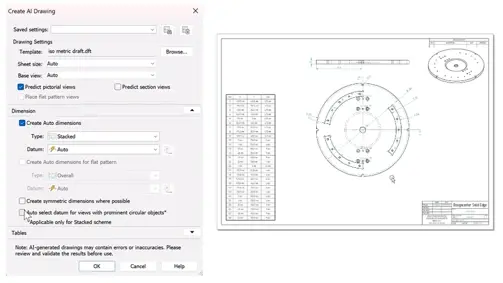
Fig 3: AI Drawing menu (Left); Resulting Drawing (Right)
Faster Workflows
Synchronous hole workflow in ordered modeling
Users can now place holes in ordered models with a single click, with no sketch geometry required. Dimension each hole to existing geometry in real time and adjust its parameters from the Context Toolbar. Design intent is preserved; the sketch-based setup overhead is gone.
Pattern by points
Not every pattern array is rectangular or circular. The new pattern by points feature lets users click to define locations, or select a sketch profile, to build irregular patterns with precise placement. Patterns stay associative, so editing the parent profile updates them automatically.
Dynamic edit handles for ordered features
Ordered features can now be edited directly with on-model handles instead of navigating dialogs. Main input values are one click away in the Context Toolbar, and synchronous technology plus keyboard shortcuts speed up modifications further. Hems also gain width options and more flexible placement.
Assembly efficiency
- Synchronous patterning in assembly: Create patterns instantly without pre-defined sketch geometry, and choose Quick, Sketch-driven, or Default patterning directly in the command.
- Offset handles in graphics: Edit assembly relationships right in the graphics window, with real-time component updates and immediate visual feedback.
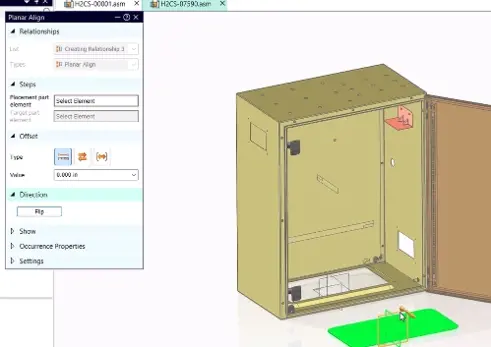
Fig 4: Edit assembly relationships in graphics window
Section view enhancements
- Quick section view in 2D drawings: create horizontal, vertical, aligned, or revolved sections in two to three clicks, with dynamic previews.
- Section view from zone: define a 3D zone box in the assembly and generate meaningful section views from it, without manual setup.
Better User Experience
Assembly interaction enhancements
- Drag under-constrained parts: Reposition components with D + click in the graphics window, keeping flexibility while constraints are still incomplete.
- Reference geometry keyboard shortcuts: display reference planes instantly with P + click or C + click, so geometry is available on the spot.
Annotation and documentation
- Dowel hole symbol: Place automatically across a drawing, or manually for precise control, for accurate and consistent annotation.
- Feature quantity callouts in 2D and 3D: Document repeated holes and slots, with quantities separated by individual pattern or feature.
- Enhanced annotation colors: Apply color settings to individual PMI dimensions and annotations for a clearer, more consistent model-based definition (MBD) experience.
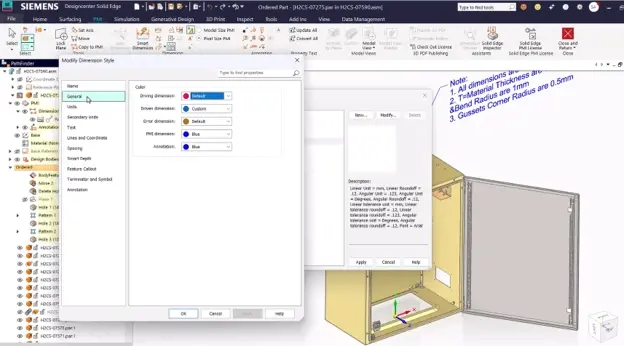
Fig 5: Annotation color options
Part and sheet metal enhancements
- Bisector plane: create a reference plane exactly between two angled faces, with no construction-geometry workarounds.
- Slot intelligence in part copies: slot patterns are recognized and replicated automatically in copied parts, maintaining design intent across variations.
- Weld bead command in sheet metal: add weld beads from the Sheet Metal ribbon without switching environments.
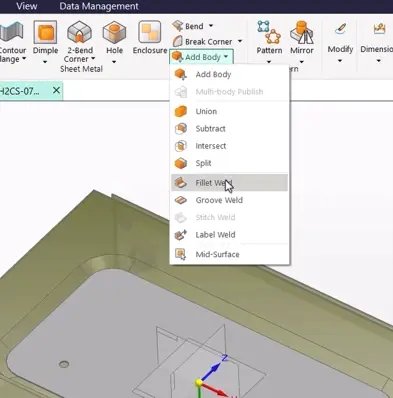
Fig 6: Weld options in Sheet Metal menu
Simcenter Simsolid
Solid Edge 2027 connects directly to Simcenter Simsolid, so designers can run structural, thermal, and durability analysis on the original CAD geometry, with no cleanup, meshing, or preprocessing.
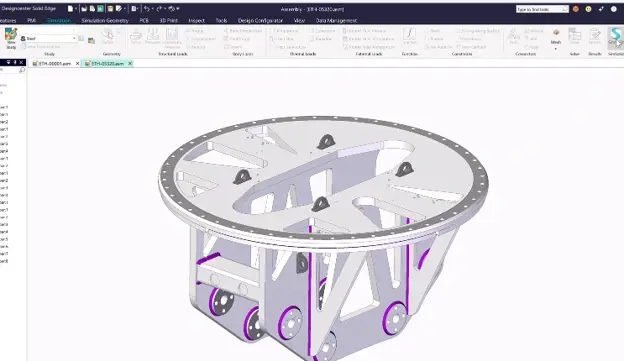
Fig 7: Simsolid icon on Simulation Ribbon
Meshless simulation results in seconds to minutes
Simcenter Simsolid analyzes full-featured, manufacturing-ready assemblies as they are. Because there's no mesh to build, results come back in seconds to minutes, which makes it practical to bring simulation in much earlier in development rather than saving it for a final check.
How the workflow fits together
- Active geometry transfer: send an assembly from Solid Edge to Simsolid in a single action. No file export, geometry repair, or rebuilding the environment.
- No-mesh analysis on full geometry: Simsolid detects structural connections automatically and runs the simulation at full fidelity, without simplification.
- Identify optimization opportunities: instant results show stress distribution and where weight can come out, so you can explore more design variants faster.
- Live design updates, validated results: change the geometry in Solid Edge, push it back to Simsolid instantly, and validate the optimization, reducing the need for physical prototypes.
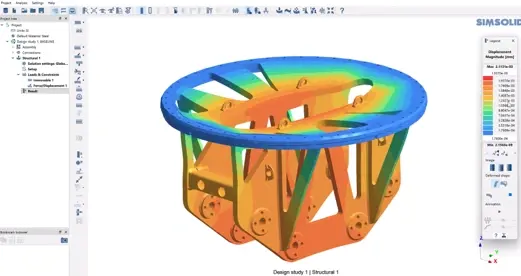
Fig 8: Simsolid displacement results
Whether you're after agentic AI, faster ordered modeling, or simulation without the meshing headache, Designcenter Solid Edge 2027 has features designed to make your life easier. Contact the TrueInsight team for a live demo, questions or upgrade guidance.