
TrueInsight
Siemens/Altair Channel Partner
Menu



What's new in Solid Edge 2026
Solid Edge 2026 brought AI-assisted assembly, automatic drawings, a sheet metal overhaul, and a new name. Here's what changed.
Solid Edge 2026 launched late last year, and it showed up with a new name on the box. Siemens now brands the product Designcenter Solid Edge, and the cloud version is Designcenter X Solid Edge. Same software, same file formats, new label. If you have seen this new branding appear in your license portal and wondered what you missed, the short answer is nothing. We have been asked the question “Are Siemens Solid Edge and NX now just Designcenter?” many times.
Siemens announced the Designcenter brand at CES in January 2025 and reintroduced it at Realize Live that June, folding NX, Solid Edge, and the underlying technology stack. This means that Solid Edge users will start to see some added enhancements that might have previously only been seen in NX, and vice versa. In this post, I will cover some of the newer features in the Solid Edge tools that users are enjoying with the initial 2026 release and patches.
Sheet metal got the biggest functional upgrade
Sheet metal has always been one of Solid Edge's strongest areas, and 2026 leaned into it.
Tab-and-slot automation builds interlocking joints between parts in a single operation. If you design weldments or self-fixturing enclosures, you know how much manual work is used to laying out tabs, cutting matching slots, keeping them aligned through every design change. Now it’s one command that updates with the model.
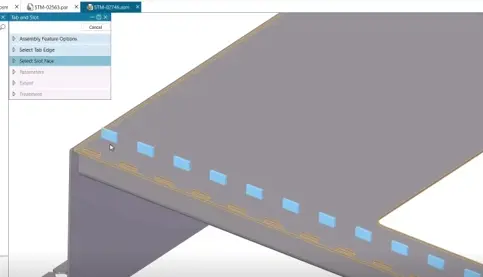
Fig 1: Tab and Slot Automation Feature
Alongside that, a few other usability enhancements make doing repetitive tasks easier:
- Wall thickness controls are now integrated across the major modeling commands instead of living in separate workflows.
- Flange trimming got smarter about manufacturability.
- New Fill Pattern tool applies repeating features across a surface. Think of vent patterns, perforations, or grip texturing.
- Etching improved on curved surfaces and design intent can now be included.
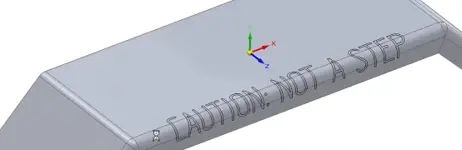
Fig 2: Etching on curved surfaces
AI and Automation to Save Clicks
Every CAD vendor is putting AI in a press release right now. What I like about this release is that most of it lands on tedious work rather than on the parts of the job engineers enjoy.
Magnetic Snap Assembly is the one I would point to first. As you drag a part into an assembly, Solid Edge recognizes the likely mates and snaps the component into position. You are not stepping through a constraint dialog for every fastener anymore. On a large assembly with a lot of repeated hardware, that adds up fast.
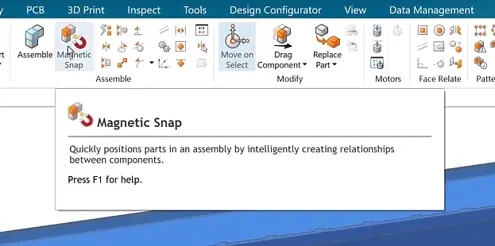
Fig 3: Magnetic Snap in Designcenter Solid Edge
Automatic Drawing generates 2D views with minimal setup. Siemens estimates that roughly 80% of drawing views can be produced automatically. If drafting is the bottleneck between a finished model and a released part, this can be a feature that moves your schedule.
Design Copilot is a contextual assistant built into the application. It debuted in NX and carried over here. It answers, "how do I do this?" questions without sending you to a browser tab, which is genuinely useful when you are learning a command you use twice a year.
Drafting and documentation
Beyond the automatic drawing generation, a few smaller additions matter more than their size suggests.
- Mid-plane reference planes now drop in with a single click.
- Revision tracking happens directly inside the drawing rather than in a parallel spreadsheet which is prone to human error.
- 3D PDFs now support section views, which is a quiet win it means you can send a supplier or a non-CAD stakeholder a file they can cut through and inspect without a seat of anything.
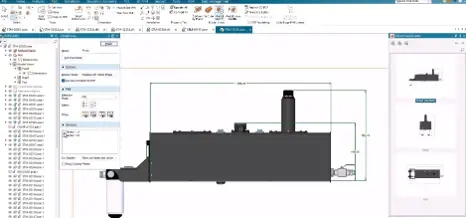
Fig 4: 3D PDF section view options
Assembly and visualization
Multiple display configurations let you save and switch between different visual states of an assembly shown, hidden, transparent, simplified without duplicating the file. Anyone who has maintained three near-identical assembly files just to produce three marketing images will appreciate this. Explode views can also be saved as configurations and included in these configurations.
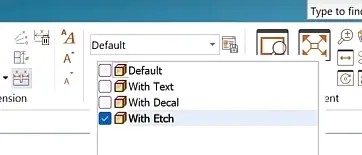
Fig 5: Visualization configuration example
Then there is the Walkthrough command, which lets you navigate a model in first person using keyboard, mouse, or an Xbox controller, and record a fly through path for presentations. It sounds like a novelty until you are walking a customer through the interior of a large piece of equipment on a review call, and it turns out to be the most intuitive way anyone has found to do that.
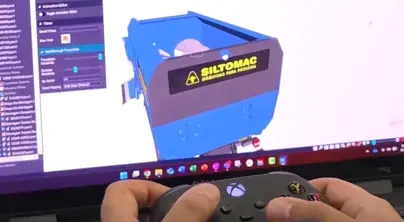
Fig 6: User controlling walkthrough using Xbox controller
Interface Changes
Solid Edge 2026 added a dark theme. This has been shown to reduce eyestrain in low-light environments, saves on battery life for OLED screens and minimizes blue light before sleep.
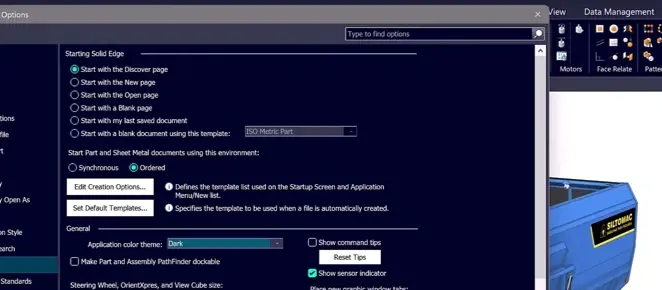
Fig 7: Dark Theme options in preferences
A few other interface enhancements for users:
- Icons moved to scalable SVG format so they stay crisp on high-DPI displays, and command bars were redesigned to cut clicks and visual clutter.
- Preferences now sync through the cloud, so your settings follow you between machines.
- Undo and redo also cover visibility commands now, which closes a small but persistent annoyance.
Data migration and interoperability
Three additions here worth knowing about.
- DSTV Export writes directly to steel fabrication machinery.
- Elysium CADFeature, a former Altair Partner Product, handles high-fidelity migration from other CAD systems with built-in quality checking, which is relevant if you are consolidating onto Solid Edge from a mixed environment.
- Import Autodesk Revit models, which matters if you design equipment that lives inside an architectural model.
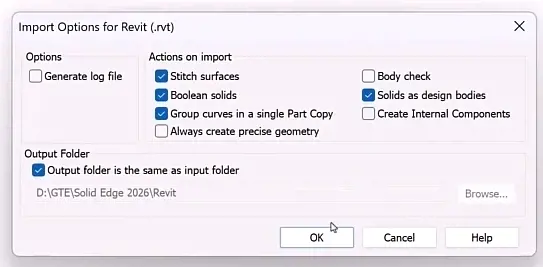
Fig 8: Import options for Autodesk Revit
Should you upgrade?
The case for moving to 2026 makes a lot of sense if anything above helps to alleviate any design pain you might be feeling. To summarize a few bigger themes of the release, I think there are three benefits every team can realize by upgrading to the new version:
First, drafting time. Automatic Drawing produces 2D views that Siemens describes as 70 to 80 percent complete before you touch them, and if your team releases prints every week, that could be the single largest time recovery in the release.
Second, assembly speed. Magnetic Snap Assembly makes component placement much more efficient, even if it’s a fraction of that time, it matters on an assembly with hundreds of fasteners.
Lastly, Tokens let you reach simulation, generative design, CFD, piping, electrical routing, and inspection without buying a dedicated seat for each. For a team that needs CFD twice a quarter or runs the occasional topology study, that changes the economics of capability access more than any single feature on this list.
Siemens has additional information on this release here: Designcenter Solid Edge 2026. If you have any questions or want to talk about Solid Edge in further detail, don’t hesitate to reach out to us.