
TrueInsight
Siemens/Altair Channel Partner
Menu



What's New in Simcenter SimLab 2026
In this post we look at the 2026 release of Simcenter Simlab (formerly Altair SimLab) and highlight some features.
In this blog we walk you through the most significant new features and enhancements in Simcenter SimLab 2026, (Formerly Altair SimLab). SimLab is the perfect blend of advanced simulation capabilities with the ease of use that comes with most CAD tools. The 2026 release offers some new features from a landmark AI integration that can accelerate predictions dramatically, to major advances in electronics thermal modeling, electromagnetic simulation, and automation.
PhysicsAI Is Now Built Into SimLab
PhysicsAI allows users to bring AI-powered design predictions directly into your multiphysics workflow. Rather than waiting hours for a traditional solver run, teams can now generate full-field and KPI predictions from CAD or mesh data. The system is trained on historical simulation data and leverages geometric deep learning because it works directly on meshes and CAD models without requiring the time-consuming preprocessing and solve steps of traditional methods.
What makes this practical rather than just a buzzword is the end-to-end workflow built into SimLab itself. Engineers can curate datasets from existing simulation history, train models, validate accuracy, and then deploy those models for real-time predictions across CFD, structural, and electronics physics, all without leaving the SimLab environment. There is also a confidence score metric that flags when a new geometry falls outside the training distribution, preventing the tool from offering unreliable predictions on novel shapes.
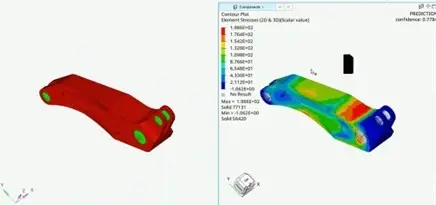
Fig 1: Physics AI example with confidence score
Battery Designer: A New Workflow for Early-Stage Battery Development
With the advancement of battery technology in the last ten years, SimLab 2026 aims to aid on that advancement process by introducing Battery Designer, a purpose-built platform for battery design at the pre-CAD/Design stage. This is a significant addition for teams working in electrification who need to validate battery designs early in their cycle before detailed geometry is available.

Fig 2: Battery Designer ribbon
The workflow is structured around a few core capabilities. The Cell Catalog provides a library of cells with geometry and equivalent circuit model (ECM) parameters ready to use. The Parameter Fitting tool allows engineers to fit ECM models up to third order using pulse-discharge or charge experimental data, including GITT and HPPC profiles. A Create Cell tool makes it possible to add custom or proprietary cell templates to the catalog.
From there, the Battery Module tool builds simulation-ready battery modules from user-defined parameters, including busbars and cooling channels for standard library cells. The 1D Battery Pack workflow rounds things out by enabling direct creation of system models in Twin Activate from the 3D geometry prepared in SimLab.
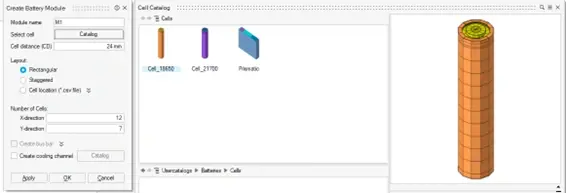
Fig 3: Create Battery Module dialog with cell catalog
For teams doing early design trade studies on battery packs, this workflow removes a significant amount of manual setup that previously had to happen outside SimLab.
Electronics: Faster ECAD Import and Expanded Packaging Tools
The electronics workflow in SimLab 2026 has received a set of practical improvements that will be felt immediately in day-to-day use. With how many designs now include both mechanical and electrical components, ECAD model import is a focus on this release and is substantially faster.
A new option to import ECAD data as wire bodies reduces import time for large, complex boards by approximately 80%. An additional option to skip polygon merging during import further accelerates the process for models with dense trace data. Vias can now also be grouped by diameter during import, making downstream model organization more manageable.
On the new feature side, a new Create QFN tool has been added which generates mesh for quad flat no-lead components with solder, using either user-defined models or SimLab templates. This can be useful for thermal or structural simulation scenarios on PCBs that contain these components.
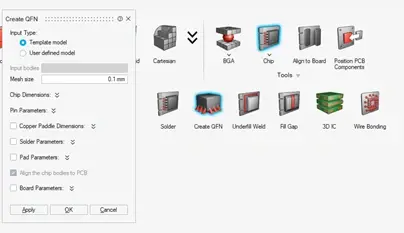
Fig 4: Create QFN ribbon and dialog menu
In addition to that, the existing Create BGA tool has been updated with four new mesh patterns and a series of improvements including automatic body merging in output, automatic node equivalencing between solder balls and copper pads, and material transfer from CAD bodies to solder bodies. The Advanced BGA tool now supports creating CAD BGAs directly from CAD geometry for both box and cylindrical bump shapes.
Meshing: Preserved Controls and Improved Robustness
Several meshing enhancements in 2026 address common sources of frustration in complex model preparation. There are quite a few enhancements in this area. I will cover a few here, but for a more in depth look you can check out the SimLab Release notes here.
The Symmetry Mesh control has a new Preserve Face Topology option that retains all edges on a face during meshing, preventing fine geometric details from being simplified or collapsed. By default, SimLab's Symmetry mesh will collapse or ignore small or narrow edges if they fall below the mesh size threshold, it treats them as noise and smooths over them. Preserve Face Topology tells the mesher to keep every edge exactly where it is, regardless of size. This is particularly useful for models where edge placement has structural significance.
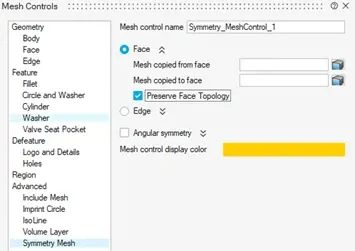
Fig 5: Mesh Controls menu for Symmetry Mesh with Preserved Face Topology option
Auto Extrude has been improved for generating hex mesh on complex geometry, and the Screw Mesh tool now supports a user-defined shank diameter and the option to create a pretension section face during screw mesh generation.
Automation: UI Designer and Expanded Parameter Functions
The Automation workflow in SimLab 2026 introduces a UI Designer tool that allows engineers to build custom input dialogs using a drag-and-drop interface, no manual coding required. Dialog designs can be exported as either .ui files for future editing or .py scripts for direct integration with SimLab automation workflows.
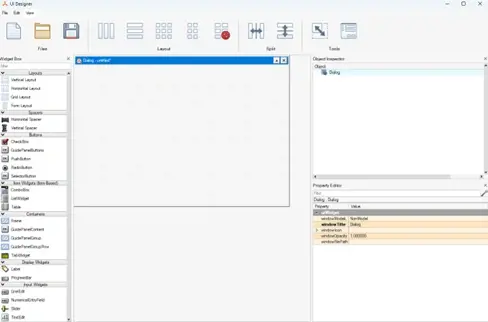
Fig 6: Drag and Drop automation interface
The Parameter Manager has been expanded with a comprehensive set of trigonometric and signal functions, including TAND, SIND, COSD, ASIN, ACOS, ATAN2, and specialized periodic signal functions like VALID, MODULO, TRAPEZ, and TRAPEZPER. These additions reduce the need to write custom scripts for common parameterization tasks.
Overall, SimLab 2026 is a substantial release. PhysicsAI integration is the obvious headline, not only because of the term “AI” being a buzzword in the industry, it gives the ability to generate physics predictions at an incredible solver speed is a genuine workflow change for teams that run high-volume studies. Its the improvements in electronics packaging, electromagnetic motor design, meshing robustness, and automation tooling represent meaningful day-to-day gains across the broader engineering workflow. If your team uses SimLab regularly, this release warrants a close look at the full release notes. For questions about SimLab licensing, implementation, or training, reach out to the TrueInsight team.