
TrueInsight
Siemens/Altair Channel Partner
Menu


What Altair Customers Can Expect from the Siemens Portfolio
In this post we look at the addition of the Siemens engineering portfolio and how Altair users can take advantage.
How the Portfolios differ
With Altair now part of Siemens, many Altair customers are asking how this will impact their day-to-day engineering work. We created an FAQ sheet for some of the more common questions.
Altair’s strength remains in the engine for early-stage innovation, concept exploration, and simulation-driven design, while Siemens brings deep, production-grade systems for CAD, CFD, PLM, and enterprise-scale simulation.
The two portfolios really do compliment each other very well. This blog focuses specifically on what Altair customers can expect from the Siemens design, simulation, and data management stack, and where each toolset naturally fits.
Design: Conception to Production CAD
Altair customers are already familiar with using simulation to drive geometry rather than simply validating it. Tools like Altair Inspire are strong with topology optimization, implicit modeling, lattice generation, and rapid concept iteration. That strength doesn’t go away, but it does have a natural handoff point.
This is the space where tolerances, configurations, drawings, and production details live. In short, design tools are about taking “the right idea” and making it buildable, repeatable, and ready for the real world.
Siemens NX: Production-Grade CAD and Manufacturing
Siemens NX is the heavy-duty CAD platform you step into once your concept is no longer “just an idea.” It’s built for complex parts, massive assemblies, and tight tolerances, and it shines when design, simulation, and manufacturing all need to stay in sync. Think of NX as the place where optimized geometry turns into something you can build, machine, and certify.
We have been working in this industry for the last twenty years and can say that NX has been growing steadily in terms of its capability and competitiveness to the point where it is a standard in many companies for design.
What Siemens NX adds:
- Full parametric and feature-based CAD
- Complex assemblies and configurations
- Integrated CAM, machining, and tooling
- Advanced surfacing and PMI
- Associativity across CAD, CAE, and CAM
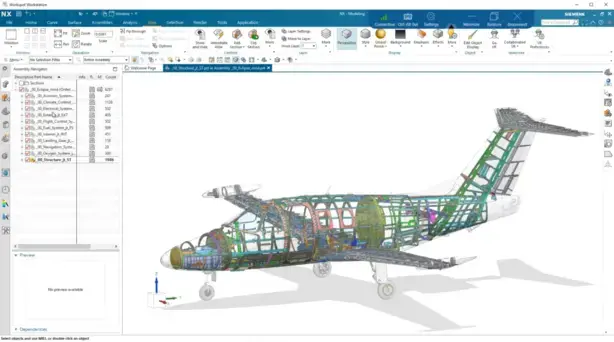
Fig 1: Siemens NX interface of aerospace fuselage design
Solid Edge: Accessible CAD with Enterprise Depth
Solid Edge is a more approachable CAD option that still packs a lot of power. It’s great for teams that want professional mechanical design without the overhead of a full enterprise CAD system. Solid Edge is fast to learn, flexible to edit, and especially strong when designs change late in the process. For Altair users, it pairs nicely with simulation-driven design by letting you quickly turn optimized concepts into clean, editable CAD without slowing things down.
What Solid Edge adds:
- Synchronous technology for fast edits
- Sheet metal, weldments, and standard parts
- Electrical and mechanical co-design
- Lower barrier to entry than NX

Fig 2: Siemens Solid Edge interface
CFD: From Early Insight to High-Fidelity Flow Physics
Altair customers are accustomed to getting fast answers early. This is where Siemens adds some serious horsepower with industry-standard tools like Siemens Star-CCM+, Siemens FloEFD and Siemens FloTherm.
STAR-CCM+: Enterprise CFD at Scale
Siemens STAR-CCM+ is the Siemens flagship CFD tools that’s built for large, complex models and real-world physics, whether that’s full-vehicle aerodynamics, detailed thermal management, or multi-physics problems that go way beyond quick checks.
Where Altair tools help you explore and iterate early, STAR-CCM+ is what you use when accuracy, robustness, and confidence really matter. It’s the CFD platform you trust when the results are going to drive big decisions.
Where STAR-CCM+ begins:
- Full vehicle aerodynamics
- Complex conjugate heat transfer
- Multiphase and reacting flows
- Battery thermal runaway modeling
- Automated design exploration at scale
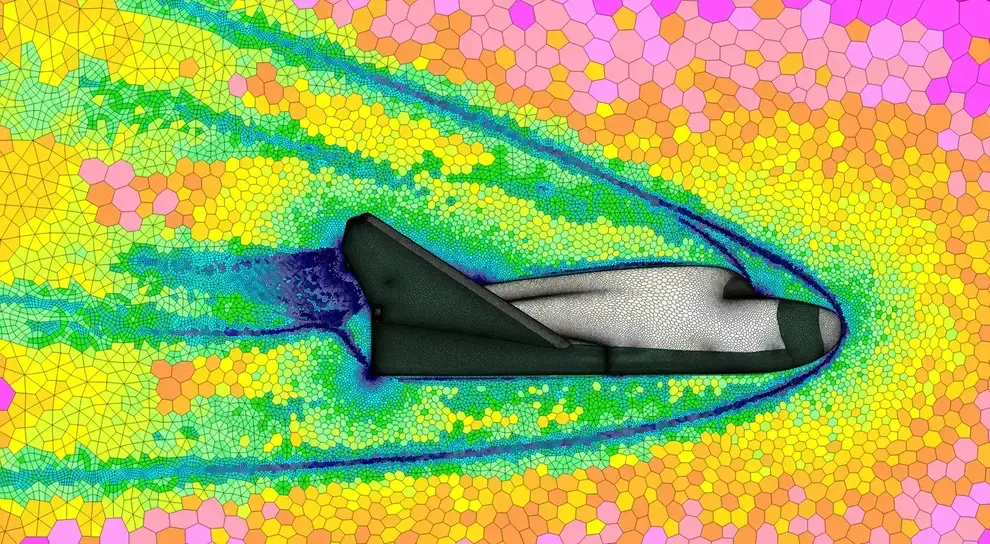
Fig 3: Volume mesh example in Siemens Star-CCM+
FloEFD: CAD-Embedded CFD for Designers
Siemens FloEFD brings CFD directly into your CAD environment, which makes it especially appealing for designers. Instead of exporting geometry and setting up a full CFD workflow, you can get fast airflow and thermal insights right where you’re already working.
FloEFD is ideal for electronics cooling, enclosures, and early thermal checks when you want answers quickly without becoming a CFD expert. It’s less about perfection and more about making better design decisions earlier.
Where FloEFD begins:
- Designer-driven CFD inside CAD
- Rapid electronics and enclosure cooling
- HVAC and internal flow analysis
- Minimal CFD expertise required
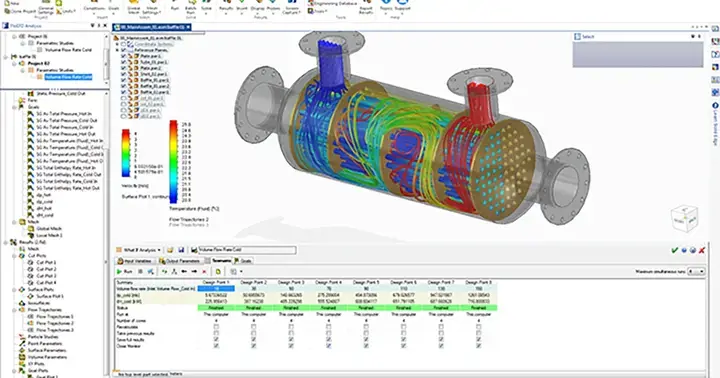
Fig 4: Siemens FloEFD interface
System-Level Simulation: Managing Complexity
Altair is well known for fast solvers, reduced-order modeling, and solver efficiency. Siemens expands this capability into system-level orchestration. With these two portfolios coming together users can get access to the widest selection of solvers now including Femap and Nastran.
Simcenter: Multi-Domain, Multi-Fidelity Simulation
Siemens Simcenter is all about connecting the dots across different types of simulation. It helps bring mechanical, thermal, acoustic, and system-level behavior together so you’re not analyzing everything in isolation. Similar to Altair HyperWorks, Simcenter is the environment that allows separate tools to work together.
For Altair customers, Simcenter sits nicely above individual solvers, helping teams understand how components interact as part of a larger system. It’s especially valuable when products get complex and performance depends on how everything works together, not just how one part behaves.
What Simcenter adds:
- Full system simulation (mechanical, thermal, acoustics)
- Co-simulation across tools
- Model-based systems engineering (MBSE)
- Test-to-simulation correlation
Data & Process Management: From Files to Digital Thread
This is perhaps the most important, and most transformative, addition for Altair customers. PLM handles versions, approvals, requirements, and change management so nothing gets lost or overwritten. For teams moving beyond small projects, PLM is what turns a collection of files into a true digital thread, connecting design, simulation, manufacturing, and lifecycle decisions in one place. Siemens Teamcenter is a leader in the industry when it comes to its universal acceptance.
Teamcenter: Enterprise PLM and Digital Thread
Siemens Teamcenter is less about doing engineering and more about managing engineering at scale. It keeps track of CAD, simulation results, revisions, requirements, and approvals so teams don’t lose control as projects grow. For Altair users used to file-based workflows, Teamcenter is the step into a real digital thread where concepts, simulations, designs, and manufacturing data all stay connected.
It’s what enables traceability, collaboration, and sanity when multiple teams and products are moving at once.
What Teamcenter adds:
- Enterprise data governance
- Version control and change management
- Requirements traceability
- Simulation data management
- Full digital thread from concept to manufacturing
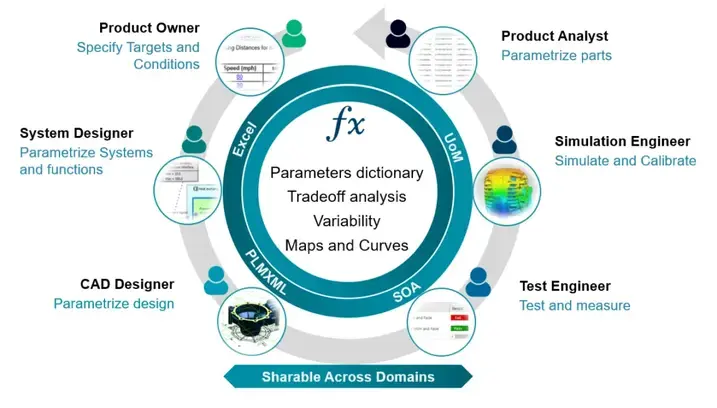
Fig 5: Teamcenter workflow overview
The overall key takeaway for Altair customers is this: Siemens doesn’t replace Altair, it completes it.
- Altair tools remain the front end of innovation
- Siemens becomes the backbone of execution
- Early exploration flows naturally into production systems
- Simulation stays central, but now spans concept to enterprise
For organizations already invested in Altair’s simulation-driven mindset, the Siemens portfolio represents an opportunity to extend that advantage all the way through design, validation, manufacturing, and lifecycle management using digital threads.
The result is not more tools for the sake of more tools, but a clearer, more connected engineering workflow that scales with you as you grow. If you have any further questions about the different toolsets or how they work together, feel free to reach out to us.