
TrueInsight
Siemens/Altair Channel Partner
Menu



When to Switch to Monarch Server
Altair Monarch Server adds onto the already powerful capabilities for data preprocessing. Check out how in this post.
Many data analytics users, both inside and outside the Altair portfolio, often face challenges when dealing with large sets of data. For so many of these applications, Altair Monarch offers much-needed solutions; Monarch is a powerful tool that is capable of extracting, processing, preparing, and exporting data to and from an extensive variety of sources and formats. Previously, we’ve taken a look at how to scale up some of the autonomy of these tools; be sure to check out our video on the topic!
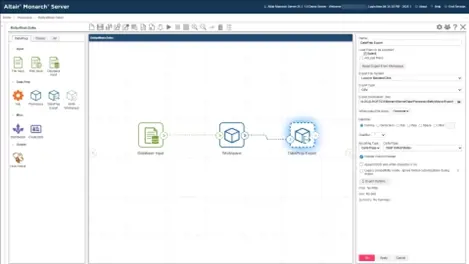
Fig 1. Example Monarch Server “drag-and-drop” automation setup.
Monarch Server takes your workflows to the next step and provides greater supervision and administration over process automation. Even though Monarch Desktop is an extremely strong tool when it comes to automating certain workflows, there are various enterprise implementations that make more sense with Monarch Server. This centralized upgrade to Monarch allows users to have a larger level of control over their automations, while also requiring far less manual input once the setup is complete. This data management platform enables organizations to distribute data and workflows more efficiently, build completely automated processes, and truly integrate data with existing infrastructure.
Org-Wide Access
Monarch, with or without COM automation, is effectively a single-machine solution; by that, I mean, each instance of Monarch largely runs independent of one another, and any form of process or data sharing requires external tools and governance. With Monarch Server, these options expand dramatically, allowing users to securely publish, collaborate on, and share data preparation models, input data, and processed or analyzed datasets.
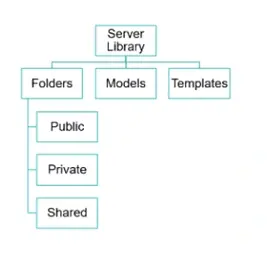
Fig 2. Controlling Data access with Monarch Server.
If you have multiple users that will need to edit workflows, while also keeping detailed audit trails, then Monarch is the way to go. Administrators can carefully govern access to inputs, outputs, and process definitions, ensuring ease of use while also maintaining any required level of compliance.
True Automation
One of the key advantages of Altair Monarch is its ability to reduce or eliminate time spent on repetitive data collection and processing tasks. There are three main ways users may currently use Monarch to accomplish this:
- Use the Monarch interface to manually load new source data and run the export.
- Use the command line interface to run Monarch, defining the model, input, and export locations.
- Use COM Auto to effectively run multiple command line instructions in “batch” mode with optional customizations.
While these are all great options, they all have one potential drawback in common: they each require some form of manual interaction. The first one obviously requires users to open the software, and the second naturally needs the command console to be opened and for commands to be entered. The third, while it has the potential for the least human intervention, still requires custom scripting, and the maintenance and launching of said scripts.
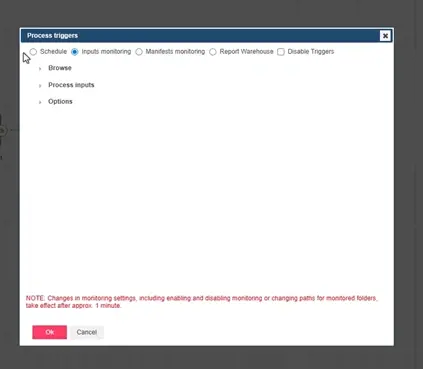
Fig 3. Controlling triggers for truly autonomous Monarch processes and tasks.
Monarch Server essentially eliminates all this technical overhead, meaning automations can be created in an initial implementation, and then they can truly run on their own. Depending on selected options, users can have dozens or even hundreds of processes running completely independently, painlessly handling the transformation, processing, preparation, analysis, and reporting for enterprise data platforms.
Data Integration
Local instances of Monarch and COM Automations are both strong for local, point-to-point tasks, but neither of them natively handles distribution at scale. To clarify, COM Automation processes can provide local results natively, but it has no true “out-of-the-box” tools for orchestrating more connected solutions. Monarch Data Prep Studio could accommodate some of those requests, but that takes us back to the concern of “True Automation”. Monarch Server addresses all these requirements and more.
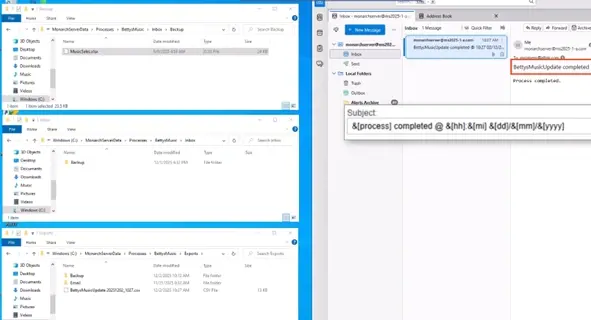
Fig 4. Range of simultaneous data connections and exports possible with Monarch Server.
While the local platforms do allow for automated processes interacting with online databases and shared file systems, Monarch Server takes this to a new level by integrating seamlessly into more stages of your workflow, more tools in your rotation, and more varieties of infrastructure simultaneously. For example, Monarch Data Prep Studio can import data from a web source and then export the results to another online reporting or data platform; however, with Monarch Server, you can integrate Monarch models, projects, and workspaces into constantly evolving databases, triggering processes based on certain activities or conditions. From there, it is possible to extend those outputs into local repositories, centralized or cloud-based locations, email inboxes, and more, all at the same time! With tasks run by COM Automation, some of this is possible, but most options are limited to the functionality of Monarch Classic. For true connectivity across all data platforms, input and output structures, and Monarch’s enterprise features, Monarch Server is the top choice.
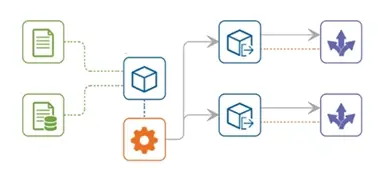
Fig 5. Generic Monarch Sever process structure.
These three pillars, Governance and collaboration, true headless/event-driven automation, and industry-scale data delivery, are among the top factors you should consider when thinking about Monarch Server. However, there are many other elements to factor in, so please be sure to reach out to us if you have any questions about implementations of Monarch versus Monarch Server or if you have any questions about the Altair portfolio of data solutions in general. As a reminder, don’t forget to check back here often for more content like this, and subscribe to our YouTube channel for even more walkthroughs, software overviews, how-to videos, and more.