
TrueInsight
Siemens/Altair Channel Partner
Menu



FEA vs. CFD: What's the Difference (and Which Do You Need)?
FEA, CFD, and multiphysics solve different problems. Here's how to choose the right simulation approach for your engineering challenge.
When engineers and product teams start evaluating simulation software, one of the first questions that comes up is a deceptively simple one: what kind of simulation do I actually need? Finite Element Analysis (FEA), Computational Fluid Dynamics (CFD), and multiphysics simulation are all powerful tools, but they solve different problems, and choosing the wrong one wastes time, money, and engineering effort. This post breaks down what each discipline does, when to use it, and how the tools in TrueInsight’s product portfolio map to each category.
What Is FEA?
Finite Element Analysis (FEA) is a numerical method for predicting how a solid structure behaves under physical loads: Stress, strain, displacement, vibration, fatigue, and impact. The solver divides a geometric model into thousands (sometimes millions) of small elements, applies boundary conditions and loads, then solves a system of equations to determine how the structure deforms and where stresses concentrate. FEA is the go-to method when your primary concern is structural integrity. Common use cases include:
- Checking whether a bracket, frame, or housing will yield or fracture under load
- Predicting fatigue life of a component subjected to repeated cycling
- Optimizing material distribution to reduce weight without sacrificing stiffness
- Simulating crash events and impact response
- Validating weld joint strength in assemblies
The quality of an FEA result depends heavily on mesh quality, material definitions, and boundary condition accuracy. Getting those inputs right is as much an engineering judgment call as it is a software task.
TrueInsight’s FEA Portfolio
As an Siemens channel partner, TrueInsight offers a deep bench of FEA and structural tools suited to different workflows and complexity levels.
Simcenter Optistruct is a structural solver built around topology, size, and shape optimization. It goes beyond verifying a design, it helps you find the optimal structure from the start. OptiStruct handles linear and nonlinear statics, normal modes, buckling, frequency response, and fatigue, making it a versatile choice for production-grade FEA across automotive, aerospace, and industrial machinery sectors.
Simcenter Radioss is an explicit dynamic solver designed for highly nonlinear, high-speed events. If your analysis involves crash, impact, blast, or drop testing (where structures undergo large deformations in milliseconds) Radioss is the tool built for it. Its parallel processing architecture scales to large models without compromising accuracy.
Simcenter Simsolid takes a different approach to FEA entirely. It eliminates the meshing step, running structural analysis directly on the as-designed geometry, including complex assemblies with hundreds of components. This makes it particularly valuable during the concept and design review phases, where rapid turnaround matters more than highly detailed meshing. Engineers can run simulations in minutes rather than hours, without simplifying geometry or creating a dedicated CAE model.
Simcenter Inspire bring topology optimization and structural analysis into an accessible, design-centric interface. They are well suited for teams who need simulation embedded in the design process rather than as a separate validation step downstream.
Simcenter HyperMesh serves as the pre-processing backbone for many FEA workflows. It handles high-fidelity meshing for complex assemblies and exports to virtually every major solver on the market. For teams running large-scale structural models, the quality of the mesh in HyperMesh directly influences solution accuracy.
Simcenter SimLab is a process-oriented finite element modelling environment designed to reduce the time spent on repetitive meshing and setup tasks. Its automated workflows are useful for teams running similar analyses across product variants or model families.
Simcenter Physics AI extends the FEA ecosystem with AI-driven surrogate models. Rather than running a full solver for every design iteration, Physics AI learns from simulation data and delivers predictions in a fraction of the time, a significant advantage when running large design of experiments or real-time optimization loops.
.webp)
Fig: FEA solution screenshots
What Is CFD?
Computational Fluid Dynamics (CFD) is the simulation of fluid flow, heat transfer, and related phenomena such as turbulence, mixing, and chemical reactions. Where FEA discretizes a solid into elements, CFD typically discretizes the fluid domain, the space the fluid occupies, and solves the Navier-Stokes equations governing momentum, continuity, and energy across that domain.
CFD is the right tool when your primary concern is how a gas or liquid moves through or around a geometry and what that means for pressure, temperature, and drag. Common applications include:
- External aerodynamics: Drag and lift over vehicle bodies, aircraft wings, or wind turbines
- HVAC and electronics cooling: Ensuring components stay within thermal limits
- Pipe and manifold flow: Pressure drop, flow distribution, and cavitation
- Combustion and reacting flows
- Mixing and mass transfer in chemical processes
CFD models tend to be computationally expensive, particularly for turbulent or transient problems. Mesh quality in the fluid domain, especially near wall boundaries, has a direct impact on accuracy, and the choice of turbulence model matters. These are not reasons to avoid CFD, but they are reasons to ensure your team has the right tools and the right level of support.
TrueInsight’s CFD Portfolio
Simcenter FloEFD is a CAD-embedded CFD tool that engineers can simulate fluid flow, heat transfer, and thermal behavior on native CAD geometry without exporting to a separate meshing/analysis environment.
Simcenter Flightstream is a rapid, panel-method aerodynamics solver designed for early-stage aerodynamic design. It runs orders of magnitude faster than full Navier-Stokes CFD while providing sufficient fidelity to guide concept selection, useful for aircraft, UAV, and motorsport teams that need directionally accurate aerodynamic data quickly.
Simcenter Hypermesh CFD is a dedicated CFD pre-processor focused on generating high-quality volume meshes, particularly for complex external and internal flow geometries. Accurate wall-normal resolution in the boundary layer is one of the most impactful levers for CFD solution quality, and HyperMesh CFD provides the controls to get it right.
Siemens STAR-CCM+ is one of the most widely used CFD platforms in the industry. It handles an exceptionally broad range of physics, from basic single-phase flow to reacting flows, free surface modelling, and complex multiphase systems, within an integrated, automated workflow environment. STAR-CCM+’s polyhedral meshing technology and built-in design exploration tools make it particularly well suited for high-fidelity, production CFD across automotive, energy, and industrial sectors.
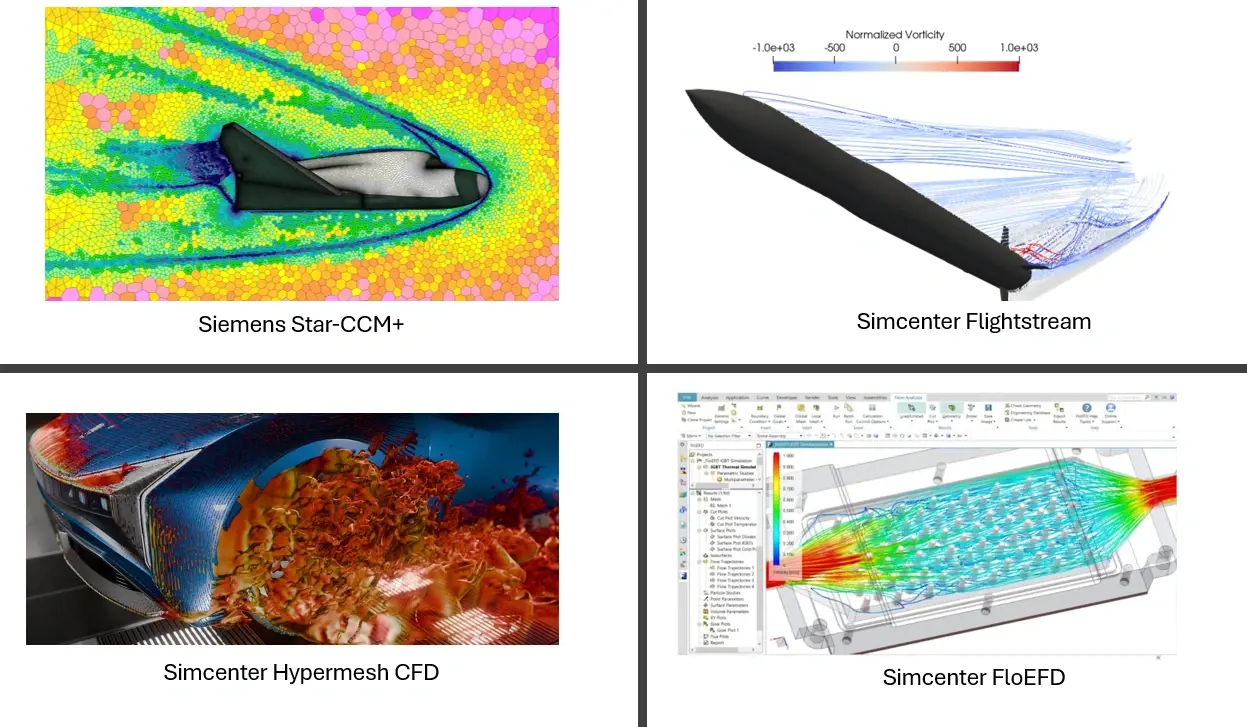
Fig: CFD solution screenshots
FEA vs. CFD: The Practical Distinction
The clearest way to think about the distinction is to ask what your model’s domain is. If it’s a solid body experiencing loads, FEA is the natural choice. If it’s a fluid or gas moving through or around something, CFD applies. The physics being solved are fundamentally different: FEA solves for stress equilibrium in a deforming solid; CFD solves for momentum and energy conservation in a flowing continuum.
In practice, the boundaries blur. A heat exchanger might require CFD to model the fluid side and FEA to assess structural loads from thermal gradients. A turbine blade involves both aerodynamic pressure loading (CFD) and structural response to those loads (FEA). This is exactly where multiphysics simulation becomes relevant.
What Is Multiphysics Simulation?
Even though we have talked about FEA and CFD as independent solutions, there is also the option for a multiphysics simulation. Multiphysics simulation refers to the coupled analysis of two or more physical phenomena that interact with each other. Rather than running FEA and CFD separately and manually transferring results between solvers, a multiphysics framework handles the coupling, whether loosely (one-way data transfer) or tightly (iteratively coupled in the same solver loop).
Examples of multiphysics problems include:
- Fluid-Structure Interaction (FSI): Fluid pressure deforms a structure, which in turn changes the flow domain. This is relevant for flexible pipes, heart valves, and aircraft panels.
- Thermo-mechanical analysis: Thermal gradients cause differential expansion and residual stresses in a structure.
- Electromagnetic-thermal coupling: Current flowing through a conductor generates heat that changes the conductor’s resistance and electromagnetic behavior.
- Acoustics: Structural vibration radiates sound, or conversely, acoustic pressure excites a structure.
Multiphysics is not always necessary. For many analyses, the coupling between physics is weak enough that solving each domain independently gives sufficient accuracy at much lower computational cost. The decision to use tightly coupled multiphysics should be driven by whether the interaction between physical domains meaningfully changes the answer.
Common Pitfalls When Choosing Between FEA, CFD, and Multiphysics
Using multiphysics when a decoupled analysis is sufficient. Tightly coupled multiphysics adds significant complexity, setup time, and compute cost. If the thermal loading on a bracket changes its stiffness by less than 1%, running a full thermal-structural coupled analysis is unlikely to change the design decision. Understand the sensitivity before committing to a coupled workflow.
Running CFD without adequate mesh resolution near walls. The boundary layer is where most of the physics happens in wall-bounded flows. Under-resolved near-wall meshes produce inaccurate skin friction, heat transfer, and separation predictions. Tools like Simcenter Hypermesh CFD exist specifically to address this.
Treating FEA mesh quality as a secondary concern. Mesh quality (the element aspect ratio, Jacobian, warping) directly affects solver convergence and result accuracy. Skipping a thorough mesh quality check before running a structural analysis is one of the most common sources of unreliable results.
Skipping the design exploration step. Running a single simulation of a single design tells you whether that design passes or fails. Running a design study across a parameter space tells you why it passes or fails, and where the margin is. Tools like Simcenter HyperStudy and Simcenter PhysicsAI make this step tractable even for computationally expensive models.
Assuming the right tool is always the most powerful one. Simcenter SimSolid’s speed advantage over conventional FEA in early design phases is a feature, not a compromise. Simcenter FlightStream’s rapid turnaround in aerodynamic concept studies is not a limitation of fidelity, it is fidelity matched to the decision being made. Using a high-fidelity solver when a faster tool gives sufficient accuracy for the current design stage delays decisions and consumes resources that could be spent on more iterations.
Which Do You Need?
The honest answer is: it depends on your problem, your design stage, and the decision you’re trying to support. A few practical guidelines:
- If you’re evaluating structural strength, stiffness, fatigue, or impact response on a solid body, start with FEA. For rapid concept-phase checks on assemblies, Simcenter SimSolid is hard to beat. For detailed structural optimization, Simcenter OptiStruct or Simcenter Inspire is the natural progression.
- If you’re characterizing airflow, heat transfer, pressure drop, or drag, start with CFD. For early aerodynamic screening, Simcenter FlightStream is efficient. For production-grade fidelity, Siemens STAR-CCM+ or Simcenter FloEFD covers the full range of physics.
- If your problem involves meaningful interaction between fluid and structure, heat and mechanics, or electromagnetics and temperature, consider a multiphysics approach. Siemens Simcenter and the broader Simcenter Hyperworks ecosystem both provide pathways to coupled analysis.
- If you’re running many design iterations across any physics domain, add Simcenter HyperStudy or Simcenter PhysicsAI to reduce the time between question and answer.
TrueInsight works with engineering teams to identify the right tools for the problem at hand, not the most complex tools, and not the cheapest tools, but the ones that will give you reliable answers at the right point in your development process. If you’re unsure which simulation approach fits your current challenge, get in touch with our team and we’ll help you work through it.